
An IPTV player is the app that turns a subscription into watchable television. It holds no channels of its own: you enter your provider’s details and the app loads the lineup, the programme guide and the on-demand library.
Choosing the right IPTV player makes a real difference to how the service feels day to day — how fast channels change, whether the guide is usable, how easy it is to find what you want. This guide compares the main IPTV player apps available in Canada and says plainly which suits which situation.
What an IPTV Player Actually Does
People often assume the app and the service are one product. They are not, and understanding the split saves a lot of confusion.
Your provider supplies credentials: either an M3U playlist URL, or an Xtream Codes login made up of a server address, username and password. The IPTV player takes those credentials, fetches the stream list, and plays whichever channel you select. Change apps and your subscription is unaffected. Change provider and the same app keeps working.
This is why no IPTV player comes with channels, and why any app promising free channels built in is something to avoid.
The Main IPTV Player Apps Compared
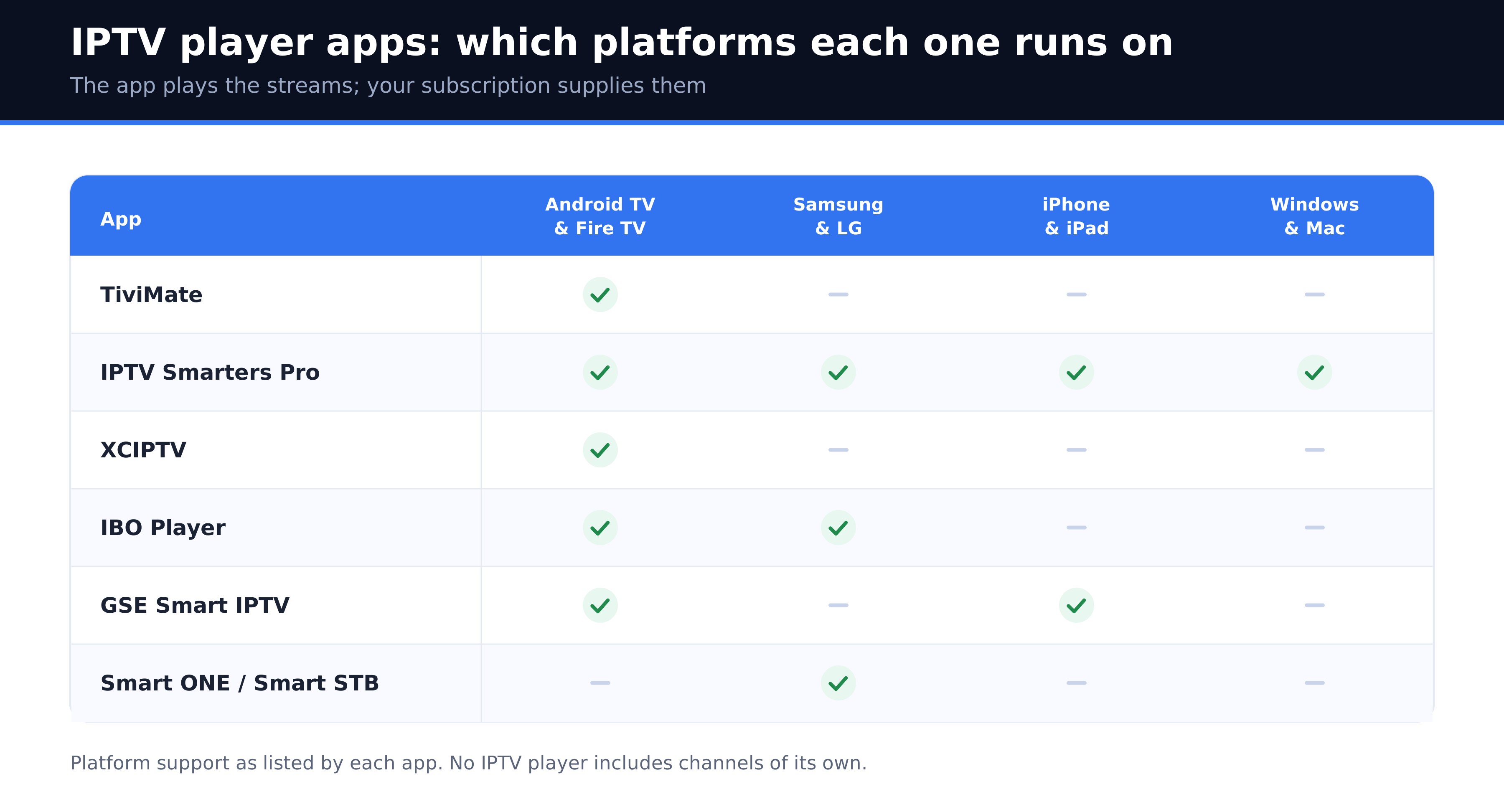
| App | Platforms | Cost | Best for |
|---|---|---|---|
| TiviMate | Android TV, Fire TV | Free tier, paid premium | The best guide and channel management |
| IPTV Smarters Pro | Android, iOS, Windows, Mac, Smart TV | Free | Working the same way on every device |
| XCIPTV | Android, Fire TV | Free | A lighter alternative on older hardware |
| IBO Player | Smart TV, Android | One-time fee | Samsung and LG televisions |
| GSE Smart IPTV | iOS, Android | Free with ads | iPhone and iPad |
| Smart ONE / Smart STB | Smart TV | Small annual fee | Tizen and webOS sets |
TiviMate
If you watch on an Android TV box or a Firestick, TiviMate is the strongest IPTV player available. The electronic programme guide is genuinely good, you can reorder and hide channels, group favourites, and run multiple playlists at once. Recording and multi-view sit behind the paid tier. The limitation is platform: there is no iOS or Windows version, so it cannot be your single app across a mixed household.
IPTV Smarters Pro
The most widely used IPTV player, largely because it runs on nearly everything — Android, iOS, Windows, Mac, Firestick and many smart TVs — with the same interface throughout. It is free, it accepts both Xtream Codes and M3U, and anyone you set it up for will find it familiar on their own device. It is not as refined as TiviMate on a television, but it is the practical default. Our IPTV Smarters Pro download and setup guide covers installing it on each platform.
XCIPTV
Lighter than the alternatives and noticeably quicker on older or underpowered Android devices. The interface is plainer, but if your box stutters in other apps, XCIPTV is worth trying before replacing hardware.
IBO Player and Smart ONE
These exist because Samsung Tizen and LG webOS do not run Android apps. Both charge a small one-time or annual fee and are usually the most practical IPTV player choice if you want to avoid plugging anything into the television. Activation is tied to the TV’s MAC address, so it does not transfer to a new set.
GSE Smart IPTV
The usual answer on iPhone and iPad. Reliable, free with advertising, and supports both credential types. The interface shows its age, but on iOS the field is narrow.
Which IPTV Player Should You Use?
- Firestick or Android TV box: TiviMate, with IPTV Smarters Pro as the fallback
- Samsung or LG smart TV: IBO Player or Smart ONE
- iPhone or iPad: IPTV Smarters Pro or GSE Smart IPTV
- Windows or Mac: IPTV Smarters Pro
- Several different devices in one household: IPTV Smarters Pro everywhere, for consistency
- Older, slow hardware: XCIPTV
You can install several and switch freely. The subscription is not tied to any particular IPTV player, so trying two costs nothing but a few minutes.
Installing Safely
Install from your device’s own app store wherever the app is listed. Sideloaded APK files from mirror sites are the common route to a repackaged build, and because you type your subscription username and password into an IPTV player, a compromised version hands over your account immediately.
Three rules cover it: use the official store when there is one, never enable installation from unknown sources to follow a forum link, and close any page that asks you to install a downloader first.
Getting the Best Picture From Any Player
Most complaints blamed on an app are really network problems. Before switching IPTV player apps, try these.
- Use Ethernet on the main television if the device has a port. This resolves more buffering than any app change.
- Increase the buffer in the app’s settings if streams stutter briefly and recover.
- Reduce the channel list by hiding groups you never watch; very large lineups slow down the guide.
- Check at peak hours. If everything is fine at noon and poor at 9 p.m., the issue is congestion, not software. Our guide to internet speed for IPTV explains how to confirm that.
If you need a subscription to use with any of these apps, see our plans and pricing, or read our guide to choosing hardware.
Frequently Asked Questions
What is the best IPTV player?
TiviMate on Android TV and Firestick, for its programme guide and channel management. IPTV Smarters Pro is the best all-round choice because it runs on every major platform with the same interface.
Do IPTV player apps include channels?
No. An IPTV player is empty until you enter credentials from a provider. Any app advertising free channels built in should be treated with suspicion.
Are IPTV players free?
Most are. IPTV Smarters Pro, XCIPTV and GSE are free; TiviMate has a free tier with a paid premium upgrade; IBO Player and Smart ONE charge a small fee for smart TVs.
Which IPTV player works on Samsung and LG TVs?
IBO Player and Smart ONE, since those televisions run Tizen and webOS rather than Android. Both are available from the TV’s own app store.
Can I use more than one IPTV player?
Yes. Your subscription is not tied to a single app, though your plan does limit how many devices can stream at the same time.
Why does my IPTV player keep buffering?
Usually the network rather than the app. Try a wired connection, raise the buffer setting, and compare performance at midday against peak evening hours before changing apps.
What is the difference between M3U and Xtream Codes?
An M3U URL is a playlist file listing channels. Xtream Codes is a login with server, username and password that also carries the programme guide and on-demand library. Use Xtream Codes when your provider offers both.